
Live P&L
Revenue, guarantee, backend, support, production, venue, hospitality, marketing, and other costs on one working ledger. Budget beside actual. It updates when you update it.
Know whether the show is working while you can still do something about it.
Paid. Break-even. Spend. Net. One current read from the first offer to the rebook call, for $300 once.
One paymentNo monthly feesNo per-user charges
Sanitized product demo · Fictional venue · Sample data
Ticket counts are in one login. Ad spend is in another. Costs are in texts and email. W-9s are buried in attachments. Settlement arrives after the decisions were already made, and the rebook call gets made from memory.
ShowLedgers puts the numbers behind every hold, door, payout, and rebook call on one board, and it makes the transition from assumption to actual visible while it is happening.
Five stages, one fictional show, the application's own arithmetic. Move the paid count, change the ad spend, rewrite the offer. Watch break-even, the gap, and the net move with it. Nothing you do here is saved anywhere.
Sanitized product demo · Fictional venue · Sample data
Pace from the sample count history: 38 paid in the last entry period. Pace comes from the counts you log, not from a feed.
| Line | PProjected | CCurrent |
|---|---|---|
| Paid | 520 | 286 |
| Ticket revenue | $21,840 | $12,012 |
| Guarantee | $7,500 | $7,500 |
| Ad spend | $4,000 | $3,240 |
| All costs | $17,550 | $16,790 |
| Net | $4,290 | -$4,778 |
The offer is the theory. Settlement is the answer. ShowLedgers keeps the three states apart and never calls a projection an actual.
What you expected when you evaluated or bought the show. The offer assumptions and the offer history.
What the working ledger says now, from the counts and costs you have entered so far.
What closed at settlement. Final paid, final costs, promoter net, and the record the next offer gets bought against.
Sanitized product demo · Fictional venue · Sample data
| Line | PProjected | CCurrent, 18 days out | AActual |
|---|---|---|---|
| Paid | 520 | 286 | 493 |
| Ticket revenue | $21,840 | $12,012 | $20,706 |
| Ad spend | $4,000 | $3,240 | $3,860 |
| All costs | $17,550 | $16,790 | $17,620 |
| Break-even | 418 | 400 | 420 |
| Ad cost per paid ticket | $7.69 | $11.33 | $7.83 |
| Net | $4,290 | -$4,778 | $3,086 |
Offer, on sale, doors, settlement, rebook. Each stage has what you enter and what ShowLedgers gives back. Nothing streams in on its own. You enter the counts, and the board tells you what they mean.
Revenue, guarantee, backend, support, production, venue, hospitality, marketing, and other costs on one working ledger. Budget beside actual. It updates when you update it.
Cumulative paid counts by date, projected count at show date from recent velocity, capacity, comps, and the break-even line drawn through all of it.
Spend by platform and campaign against the paid count you entered, plus the gap between pixel-reported purchases and real tickets. Spend per ticket, not attribution.
Advance, walk-up, comps, no-shows, scanned and unscanned, final paid, final headcount, and the paid-versus-room gap that gets reported at settlement.
Every figure reviewed, duplicates counted once, then a settlement PDF and a print view from the ledger you already kept.
W-9 needed, requested, received. Payees over and approaching the reporting threshold. Encrypted tax identifiers shown as last four. A masked year-end CSV.
Stop rebuilding the same show history from email, ticketing screenshots, and old settlement PDFs. After settlement the show stays on the board: last offer, last actual, paid against capacity, ad cost per paid ticket, walk-up, paperwork state, and your notes on the night.
Artist history and venue history sit on the next offer. The rebook score is transparent arithmetic over the settled record plus four judgments you enter. It gives you context. It does not recommend a guarantee, and the decision stays yours.
Know what changed. Know what closed. Know what you would buy again.

These are captures of the actual application running on the demo tenant with sample data. No mockups.
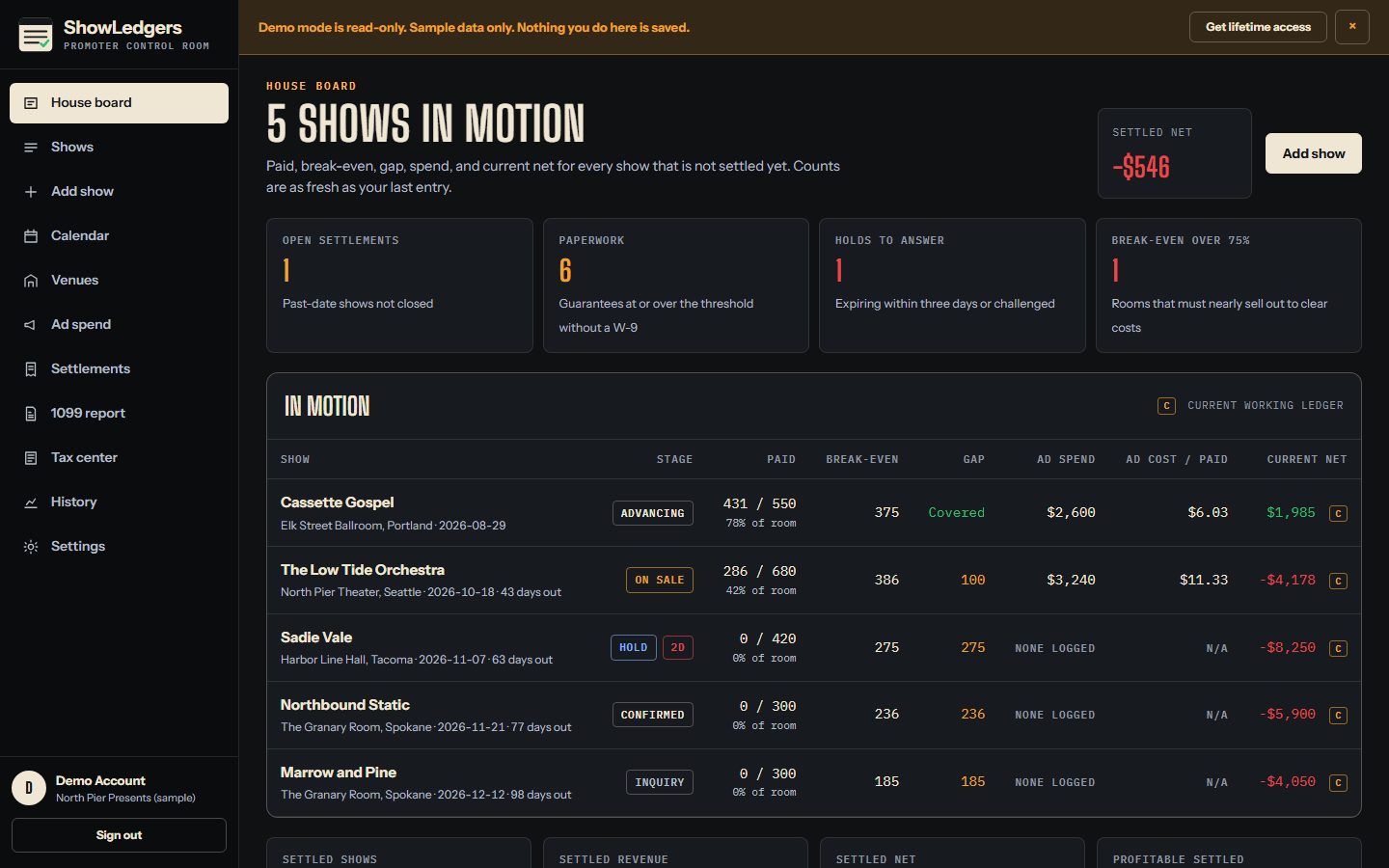
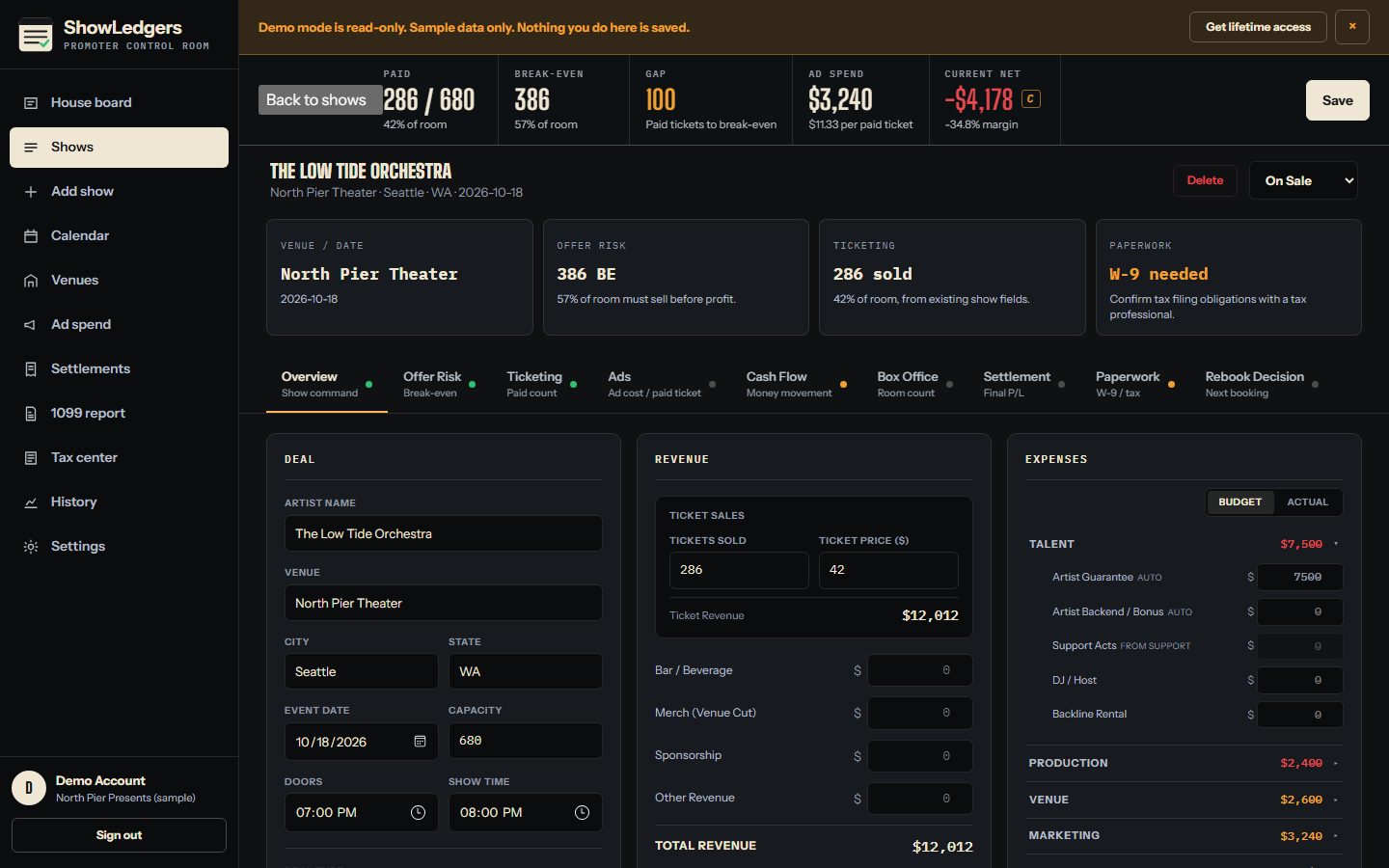
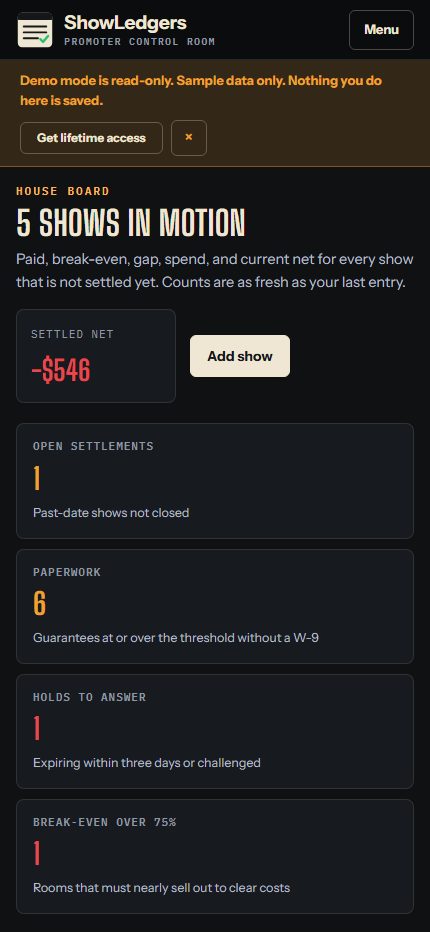
$300 once. No monthly subscription. No per-user charge. One bad show decision costs more than that, and the board is what keeps you from making it late.
What ShowLedgers does, what it does not do, and how the lifetime access works. Every answer comes from what is built today.
Independent concert promoters, talent buyers, small venues, event producers, and live-event operators who need one current read on whether a show is working.
No. Tickets keep selling through your ticketing provider. ShowLedgers is the operating layer around the show: the ledger, the counts, the costs, the settlement, and the paperwork state.
Yes. $300 once through Stripe Checkout. There is no monthly subscription and no per-user charge.
Access to the currently advertised ShowLedgers features for the life of the service under the current terms. It is not a promise of every future feature forever.
No. There are no ticketing, advertising, box-office, or accounting integrations. You enter paid counts and spend from your own reports, and the ledger recomputes from those entries.
You log cumulative paid counts by date on the show. ShowLedgers charts the entries, projects the count at show date from the recent velocity, and shows it against capacity and break-even.
Tracked ad spend for the show divided by the paid count you entered. Per campaign it can also compare pixel-reported purchases with the tickets you attribute by hand. It measures spend per paid ticket. It does not claim that advertising caused each sale.
Yes. The offer risk calculator takes guarantee, capacity, ticket price, fees, taxes, and cost estimates and returns break-even, a scenario ladder at 25, 50, 75, and 100 percent of the room, worst case, and a risk band. It organizes the numbers. It does not decide for you.
Yes. Comps by recipient on the ticket record, and a box office reconciliation with advance, walk-up cash and card, guest list, promoter and venue comps, no-shows, scanned and unscanned, final paid, and final headcount.
Yes. A settlement PDF is generated from the show ledger you already kept, plus a print view. Review every figure before you send or rely on it. The PDF is a record, not a legal instrument.
It keeps the W-9 state visible per show and per payee: needed, requested, received, entity name, date received, and an encrypted upload of the form. Taxpayer numbers are stored encrypted and shown only as the last four digits.
No. ShowLedgers organizes the year-end view: who was paid, who is over the reporting threshold, who is approaching it, and whose W-9 is missing, with a masked CSV export. Filing and the obligation to file are yours to confirm with a tax professional.
No. It is show-finance organization software, not accounting, legal, or tax advice.
Yes. The public site and the application are responsive, including paid count, cost entry, settlement review, and paperwork state.
One login per account today. There are no separate logins or permission levels, which is also why there is no per-user charge.
Stripe reports the payment to our server. The server verifies it and activates your account. You log in with the password you set during email verification, name your promoter company, and open your first show ledger.
The account page keeps checking the server for the confirmation. If it has not arrived after a short wait, use Check account status again or log in later. Activation never depends on your browser staying open. If it stays pending, email support with the email address you used.
The support form on this page or Philip@philipstengelpresents.com. Account help, billing, setup, bugs, feature requests, and show-workflow questions all go there.
Every record is scoped to your account on the server. Sessions use a signed HttpOnly cookie. Passwords are hashed. Tax identifiers and W-9 files are encrypted at rest. Financial values are never sent to marketing analytics.
No. Every query is filtered by your account on the server, not in the browser. Another account cannot read or change your shows, settlements, tax records, PDFs, or history.
Settlement PDFs per show and a masked 1099 CSV per tax year today. There is no full-account export yet. Ask support if you need one.
Nothing is charged. Your account and records stay under your login until you ask support to remove them.
Account help, billing questions, bugs, feature requests, and show-workflow questions all come through this form or Philip@philipstengelpresents.com. There is no ticket queue to fight and no chatbot.
Send the context. Never send passwords, tokens, or taxpayer identification numbers.
A settlement should close the show, not start the investigation.